
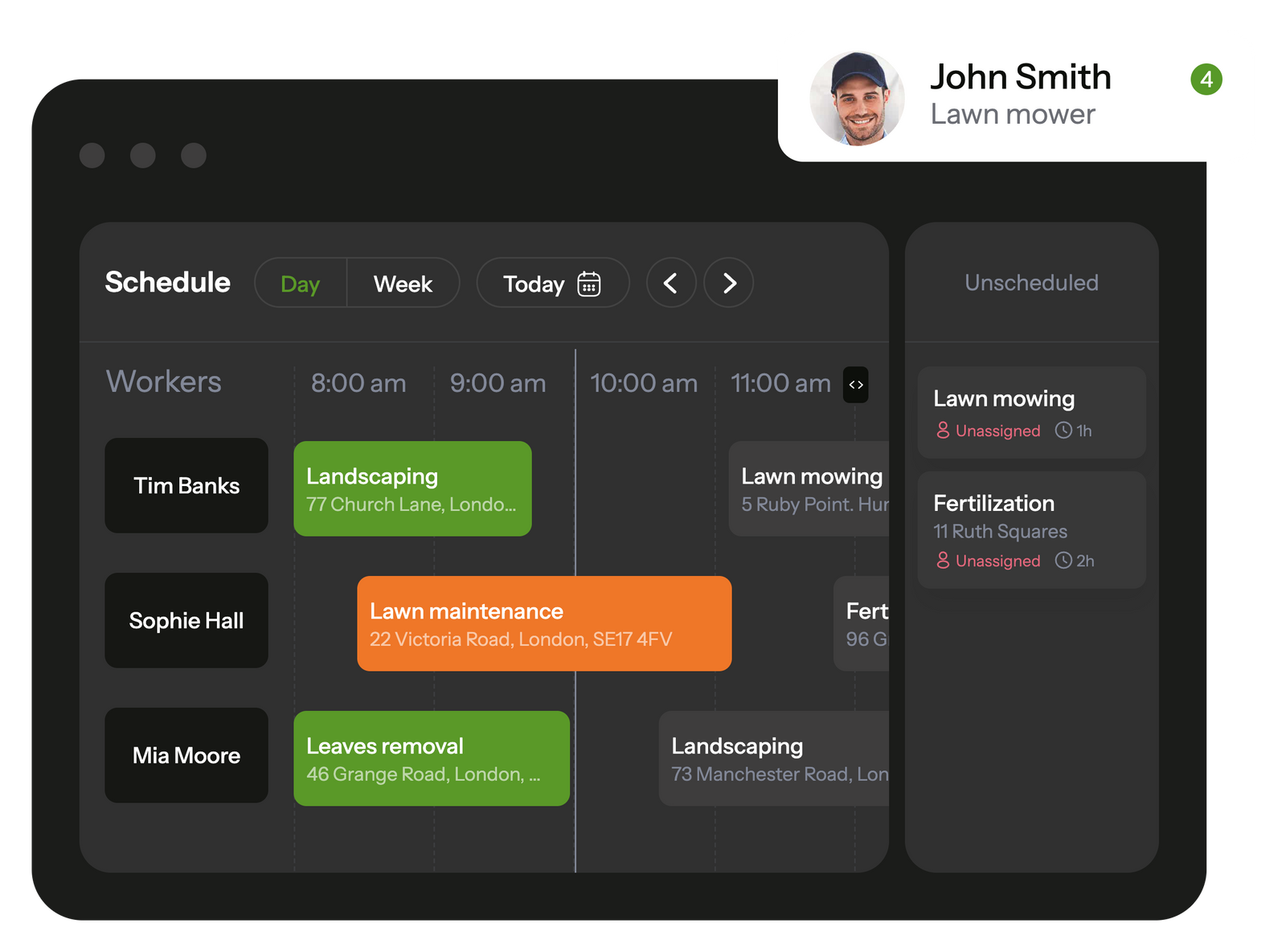
Planado simplifies task management and allows to control schedule in a few clicks
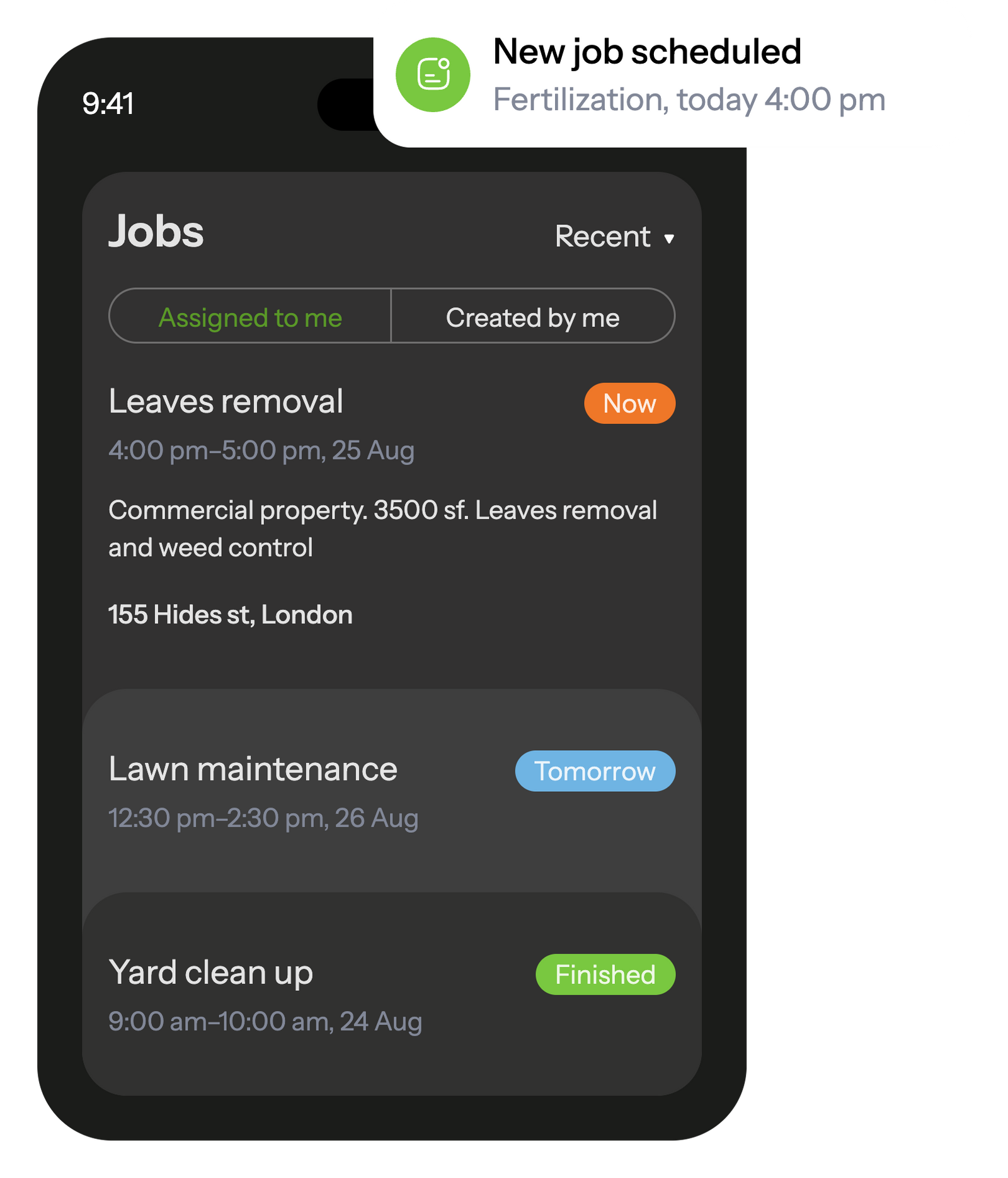
In the mobile app, your employees see all scheduled tasks and receive notifications about new assignments.
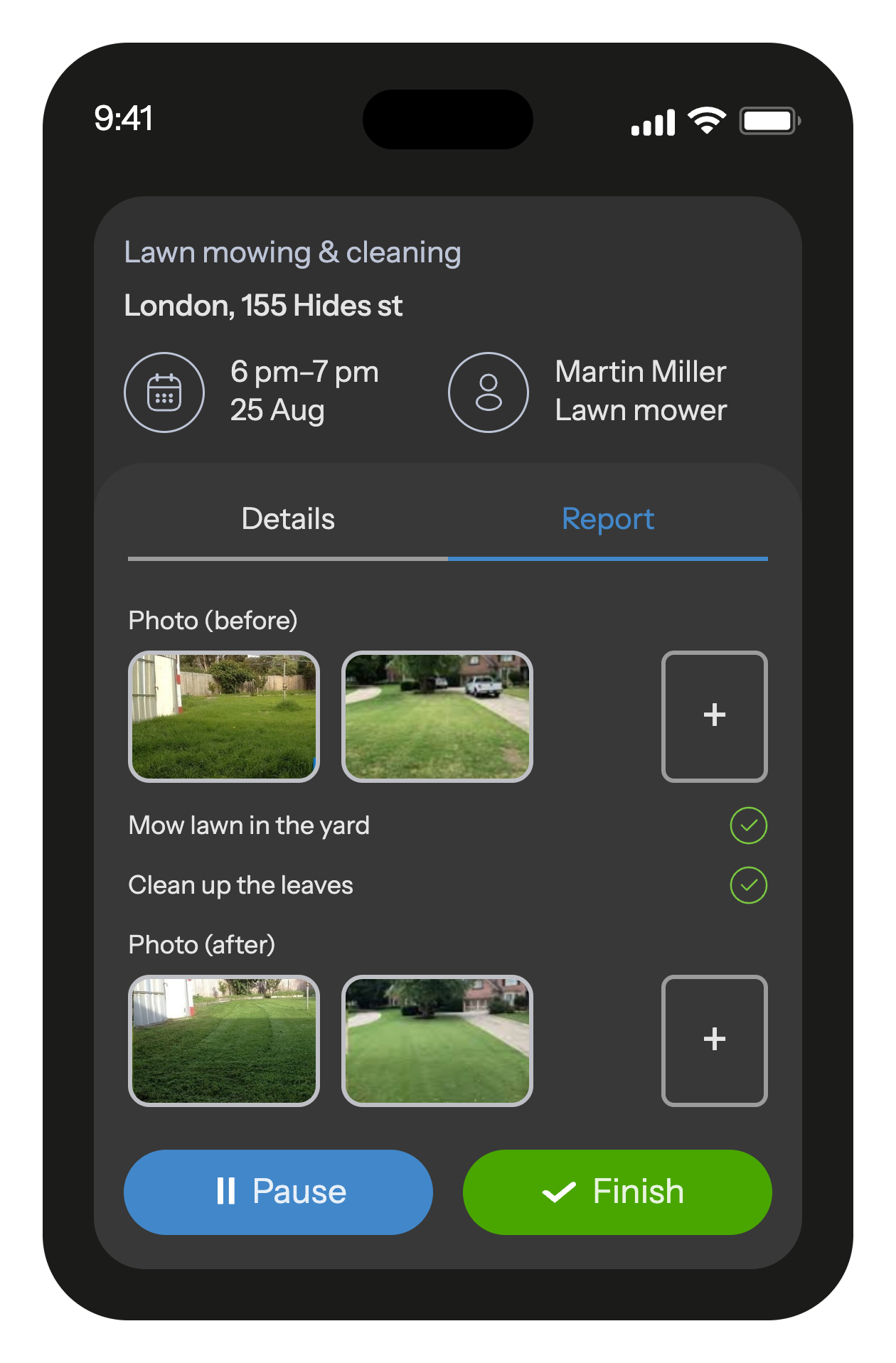
The built-in job checklists ensure that workers won't overlook any tasks on their to-do list.
When a task is completed, the employee fills out a customizable report with photos and other fields that is automatically saved in the database and transmitted to the office.

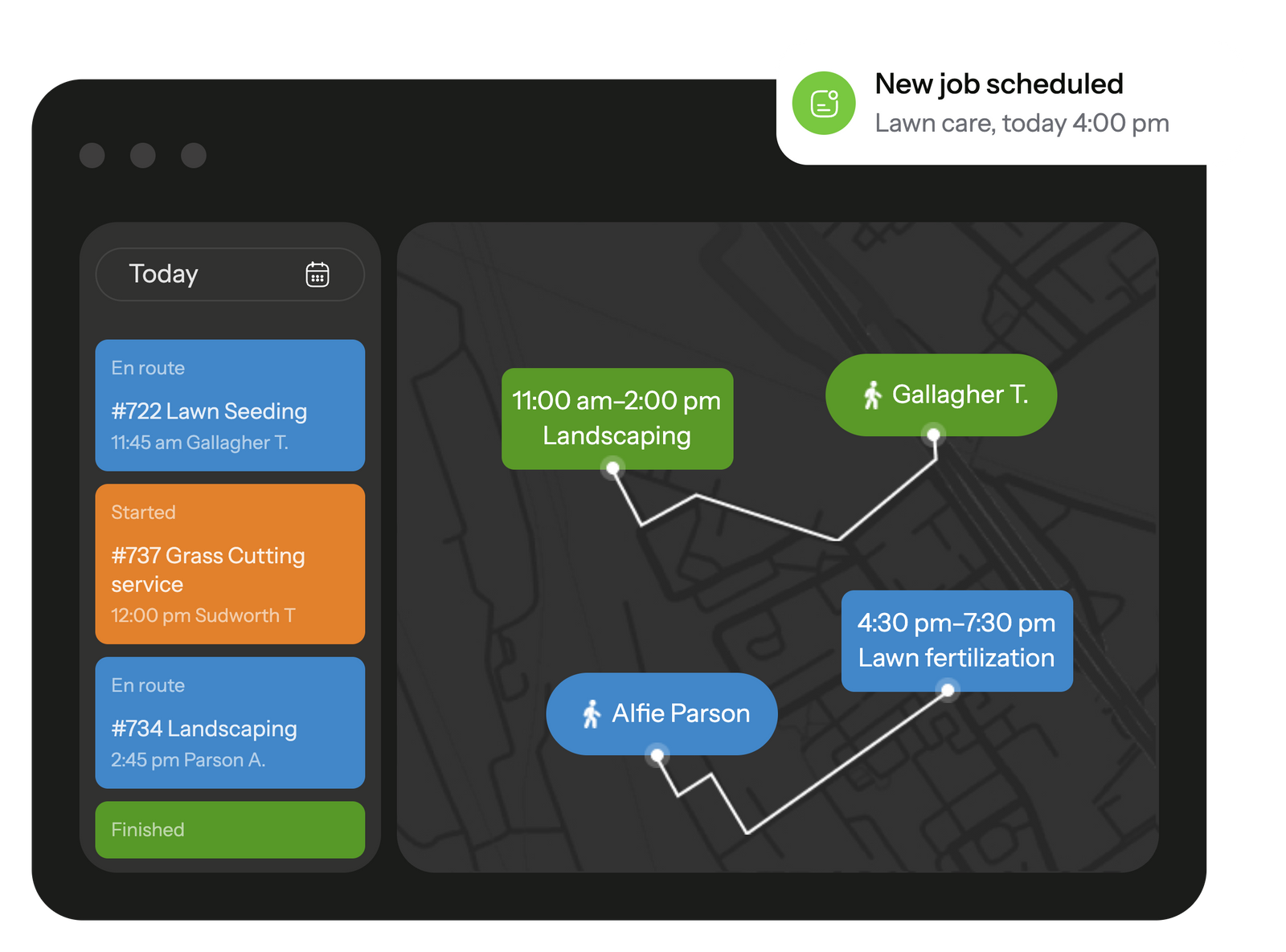
Track your workers' trip during working hours, schedule jobs to your workers based on their location right on the map. Task and movement history is recorded and available at any time
GPS location tracking helps calculate mileage and assign the closest worker to an urgent job.
When employee starts the job, he will receive a checklist with the list of actions so he doesn't forget anything to do.
After completion, he will fill out a customizable report with photo, text and other various field types.
You can also prevent starting and stopping a job beyond the site's cordinates or the scheduled time period.
Yes. Most systems let you set repeat visits and keep several properties under one client profile. It removes the need to rebuild the schedule every week and helps crews follow the same route without guesswork. If your recurring jobs often slip through the cracks, try setting them up once inside the software and see how it holds the pattern for you.
A lawn care scheduling app updates the crew’s list instantly when something shifts. Your team sees the new stop, timing, and notes without extra calls. When urgent visits are common, using an app like this helps you respond faster.
A strong lawn care CRM stores site notes, past photos, service history, and any specific requests the client mentioned before. It keeps small details – gate codes, problem spots, preferred timing – from getting lost. If you want smoother communication, start by adding this info into your CRM.
Yes. It gives both sides the same job details, status updates, and photos, so no one works from outdated information. Crews get clear instructions, and the office gets real-time visibility. Teams that struggle with scattered chats usually feel the improvement right away.
GPS tools show where each crew is and which team can reach the next job fastest. It cuts unnecessary travel and helps you adjust routes when delays appear. If long drive times slow your day down, GPS-based dispatching is an easy win.
Yes. The more crews and locations you manage, the more the system helps. It keeps schedules organized and prevents overlap between teams. If your coverage area keeps growing, consider using lawn care management software to stay ahead of the chaos.
Planado gives each crew a clear checklist and prompts them to add photos before closing a visit. It helps managers see what was done without extra calls or follow-ups. If quality slips from time to time, this simple workflow can bring consistency back.
Running a lawn care business often means juggling far more details than people expect – shifting crews, changing property needs, and clients calling to ask when their yard will be handled. When days start piling up like this, lawn care business software becomes less of a luxury and more of a way to keep the work predictable. Instead of relying on quick notes or guesswork, lawn care scheduling software gives you a clearer view of what’s ahead: which visits are due, who can take the next job, and where delays might appear before they turn into callbacks.
Modern lawn care management software brings together scheduling, on-site reporting, and communication tools so crews and office staff stay aligned. You see who’s available, which properties are due for service, and where delays might occur. One clear schedule means fewer backtracks, fewer missed details, and better consistency across all properties. And because tools like Planado add photo reports, GPS data, and checklists, you gain both visibility and a reliable way to maintain standards as the business grows.
A good lawn care business software setup takes the scattered parts of your workday – job requests, crew assignments, route adjustments, quick status checks – and puts them where they’re easy to manage. Instead of sorting through messages or walking back and forth between teams, you see the day unfold in one place. Crews know where they’re going next, the office has clearer visibility, and small issues stop snowballing into long delays. Planado fits into this flow by supporting the same tasks teams already handle, just with fewer friction points.
When crews work across different yards all day, the little details matter – gate codes, photos from the last visit, notes about problem spots. Lawn care management software pulls those pieces together so teams don’t have to chase information or rely on memory. A worker can open the job on their phone, see what needs attention, and move on without slowing the day down. The office benefits too: progress updates arrive naturally as the crew works, not at the end of the shift. With everything landing in one place, the day feels less chaotic and easier to steer.
Lawn care teams lose the most time not on the job itself, but in the gaps between visits – driving across town, waiting for instructions, or doubling back because something changed at the last minute. Lawn care scheduling software smooths out that friction. It gives you a clearer picture of who is free, which route makes sense, and where bottlenecks might appear. With a cleaner plan, the day moves in steadier steps, and crews spend more time actually working instead of navigating around the schedule.
A lawn care scheduling app helps keep everyone aligned when the day shifts. Crews receive updated instructions instantly, so they’re not guessing which stop comes next or walking into a job without context. Small changes – a rain delay, a gate issue, a client request – become easier to handle because the update lands right where the team already checks their tasks. It’s a simple adjustment for the crew, but it removes many of the gaps that usually slow a route down.
If your routes often feel scattered or you catch yourself reshuffling jobs halfway through the day, it may be time to look at how you plan the workload. Modern lawn care service software can take a lot of that strain off your plate by giving you a clearer view of the day before problems show up. Planado offers a straightforward way to test this approach and see whether tighter planning makes your team’s week run smoother.
Quality in lawn care depends on repetition – the same steps followed the same way, no matter which crew arrives or how busy the day gets. Lawn care service software helps keep that consistency intact. Crews see exactly what needs to be done at each site, the order of tasks, and any notes from past visits. Office teams get clearer records instead of scattered messages, and clients receive work that matches their expectations from one appointment to the next.
Most crews already take photos and jot notes as they work, but lawn maintenance software puts some order into that routine. Instead of guessing what to capture, technicians see a short on-site checklist that spells out the points the client cares about – edging, trimming around fixtures, or checking irrigation areas. After finishing the job, they snap a few photos right in the app, and the office receives them without delays or long message threads. Managers get a clearer picture of what actually happened on the property, and small issues are easier to spot before they turn into complaints.
On a typical workday, crews finish one yard, hit traffic on the way to the next, or call in with a small delay – and the office needs to keep up with all of it. That’s where lawn care dispatch software helps. Instead of chasing updates by phone, the office can see who’s moving, who’s running behind, and which job just wrapped up, all in one screen. When assignments shift – a crew finishes early, gets stuck in traffic, or needs support – dispatch can redirect the day with far less disruption. It also keeps jobs from piling up unevenly, since supervisors see who’s overloaded and who has room to take an additional visit.
Many companies still guess which crew is closest to the next job, but lawn service management software removes the guesswork. GPS tools show where each team is right now and how their route is unfolding, making it easier to slot in extra tasks or handle last-minute changes. Instead of sending a crew across town, dispatch can assign someone who’s already working nearby, which cuts down on travel time and keeps the schedule from drifting. For teams trying to keep their days predictable, this visibility makes a noticeable difference.
Lawn care companies rely heavily on repeat work, and staying organized plays a big part in that. A CRM helps pull scattered details into one place so your crew isn’t guessing what happened last time or what the client asked for. Instead of flipping through old messages, you get a quick snapshot of the yard, past notes, and any preferences that tend to slip through the cracks. It keeps conversations shorter, makes visits smoother, and helps your service feel more dependable from week to week.
When you work across many properties, it’s easy to lose track of the small things that separate a decent visit from a great one. Lawn care software programs give the team a clearer picture of each site – what was done before, what still needs attention, and when the next visit is due. Crews can check past photos or notes before they start, and the office can set up repeating schedules so routine maintenance doesn’t fall through the cracks. It’s a simple way to keep the work steady without relying on memory.
Running a lawn care team becomes much easier once the back-and-forth, the guesswork, and the constant checking-in stop eating up your day. Planado brings scheduling, on-site checklists, photo reports, and GPS tracking into one place, so crews know what to do and the office knows what’s happening out in the field. You’re not stitching together texts, spreadsheets, and maps anymore – the app gives you a cleaner way to run repeat routes and keep service quality steady across every property.
Planado also adapts well to lawn care work because the setup isn’t complicated. You can build task templates for recurring jobs, standardize checklists for your crews, and track completed work without chasing updates. If you handle multi-property clients or rotate several crews across wide service areas, the built-in GPS tools help you see who’s closest, who’s available, and which jobs need attention first. It’s a practical way to keep everyone moving without micromanaging each step.
If you’re ready to simplify your routes, tighten communication, and make quality control easier, try Planado and see how much smoother your week can run once the essentials live in one app.