

Planado makes task management and scheduling straightforward
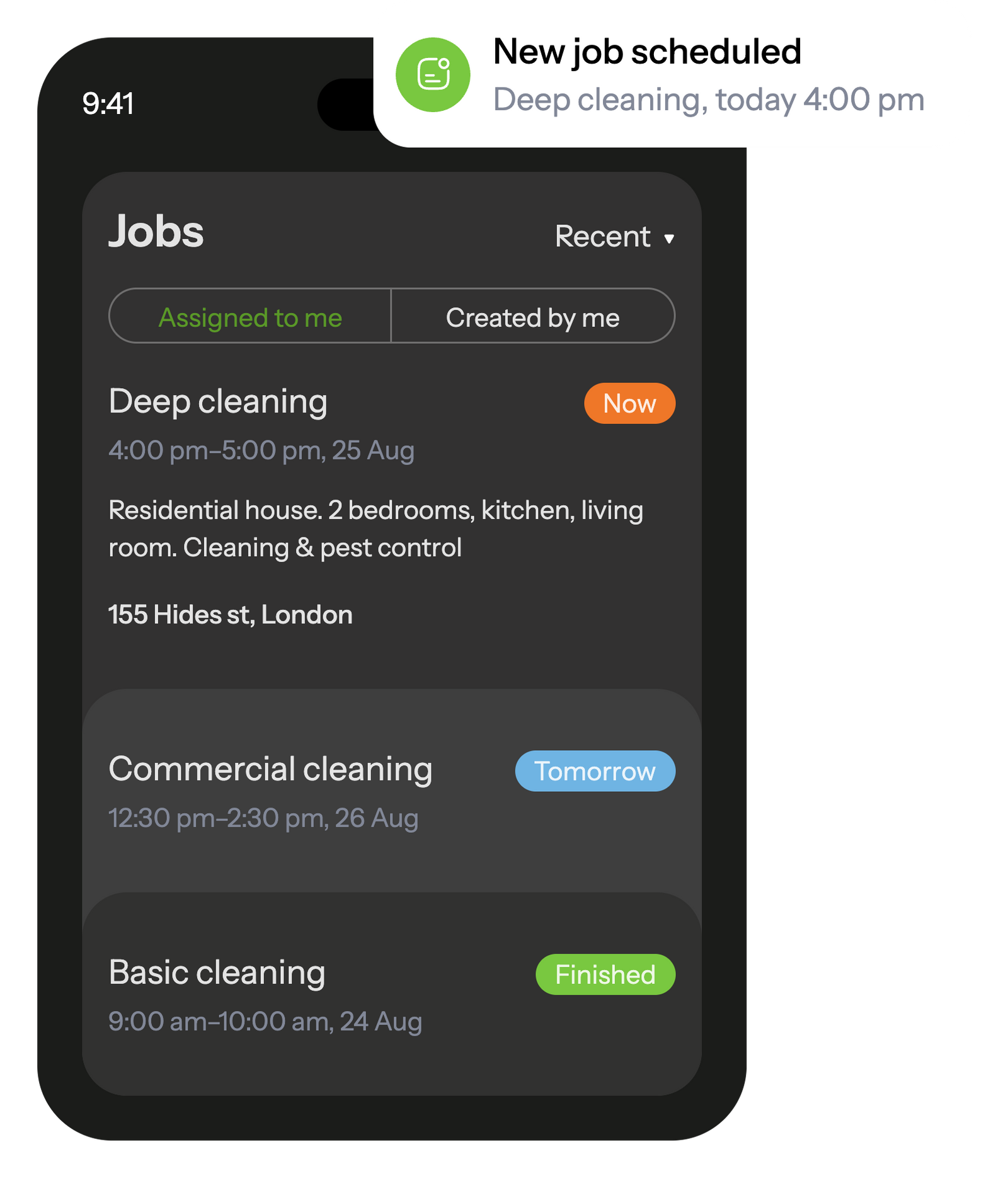
Within the mobile app, cleaning staff can view all scheduled jobs and get alerts on new tasks assigned to them.
Once a job is finished, the staff member completes a tailored report, including photographs and additional details, which is then instantly forwarded to the office.
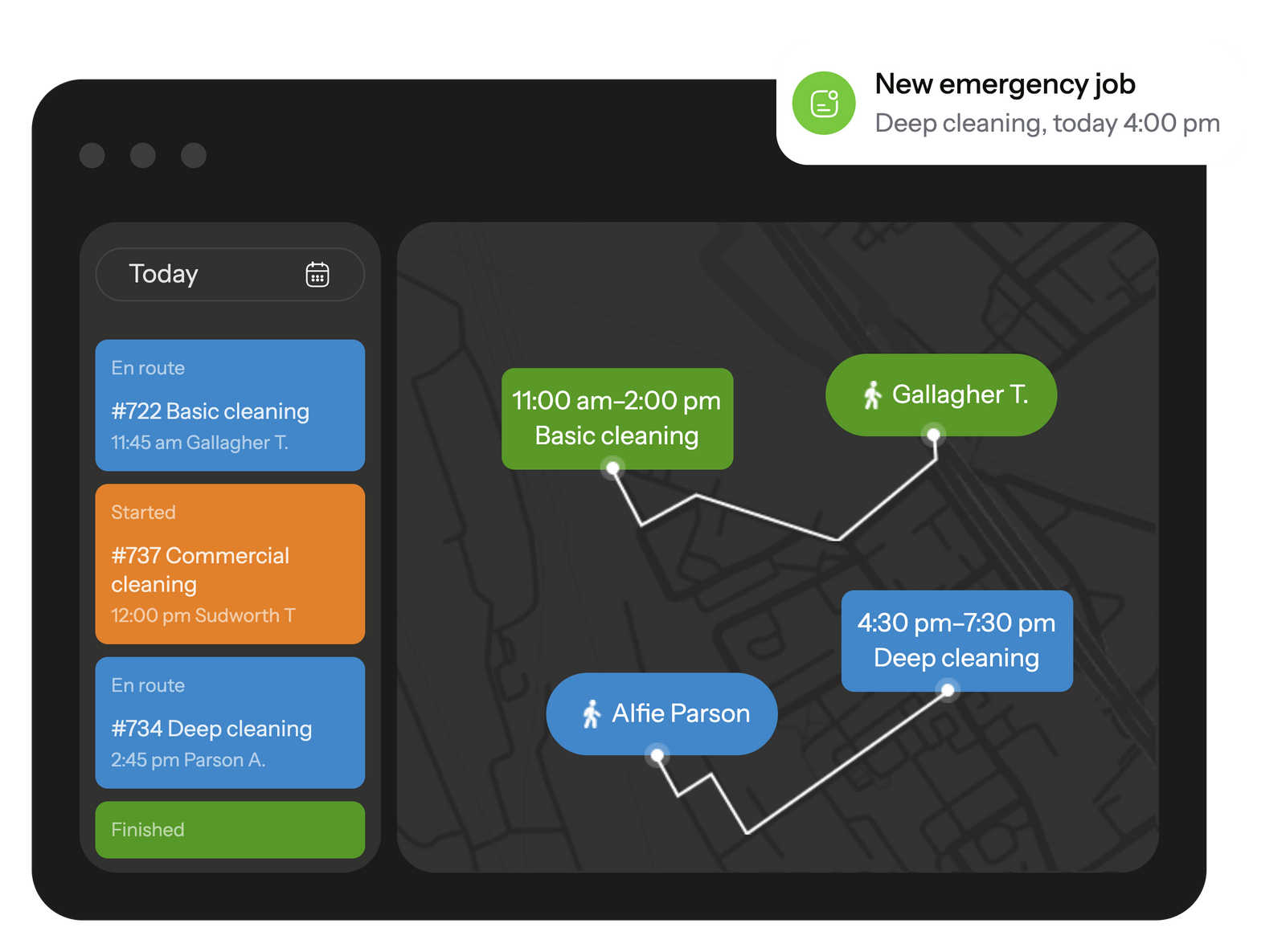
Boost your operational efficiency and maintain direct oversight of your cleaning staff with enhanced GPS monitoring.
Access detailed logs of tasks and routes at any moment, ensuring transparency and consistent performance across your operations.

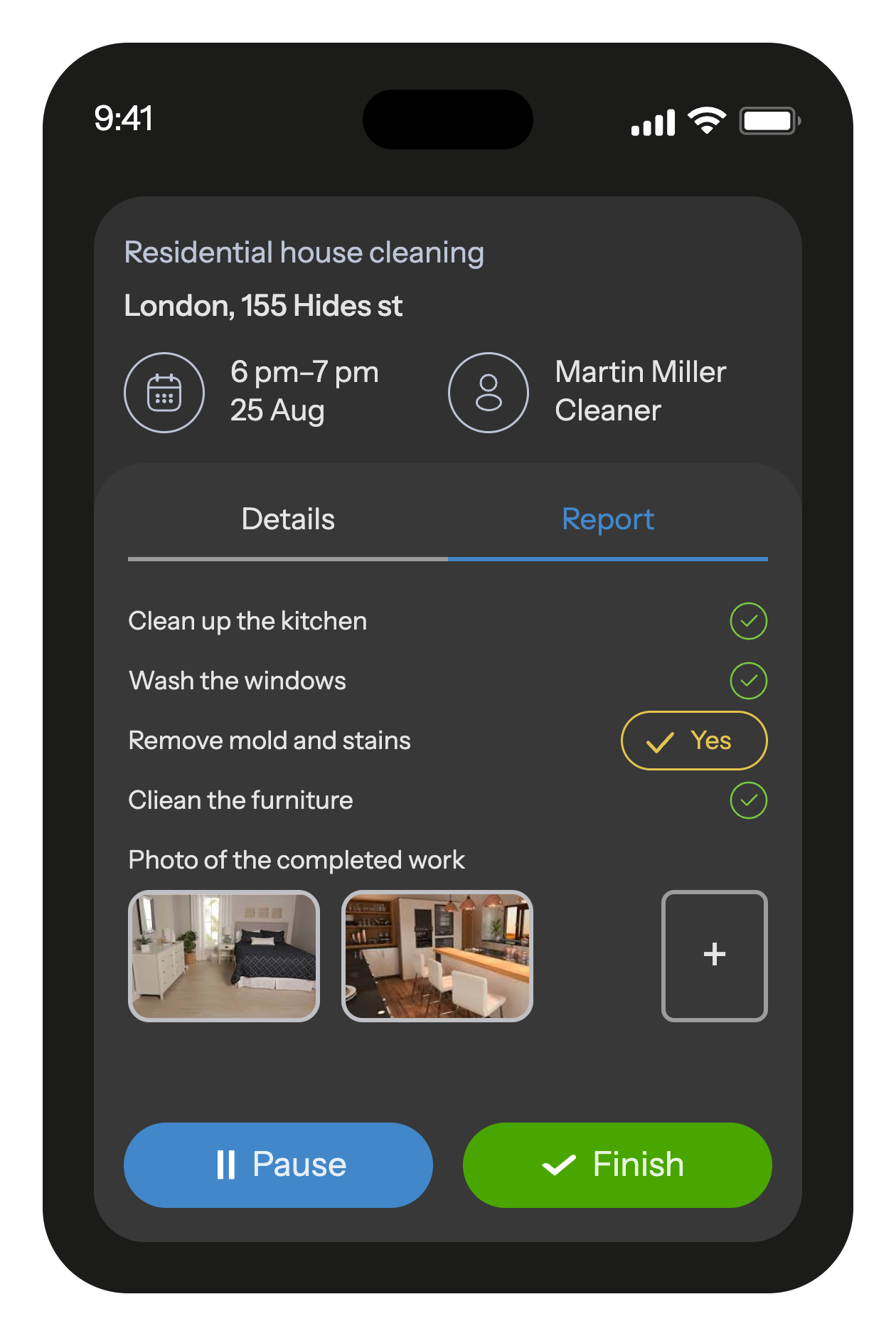
As your cleaner initiates their task, they will be provided with a comprehensive action list, ensuring no detail is overlooked.
Upon completion, they're required to submit a customizable report, enriched with photos, textual insights, and a variety of other field inputs.
Planado ensures tasks can’t be started or completed outside the set location or scheduled time.
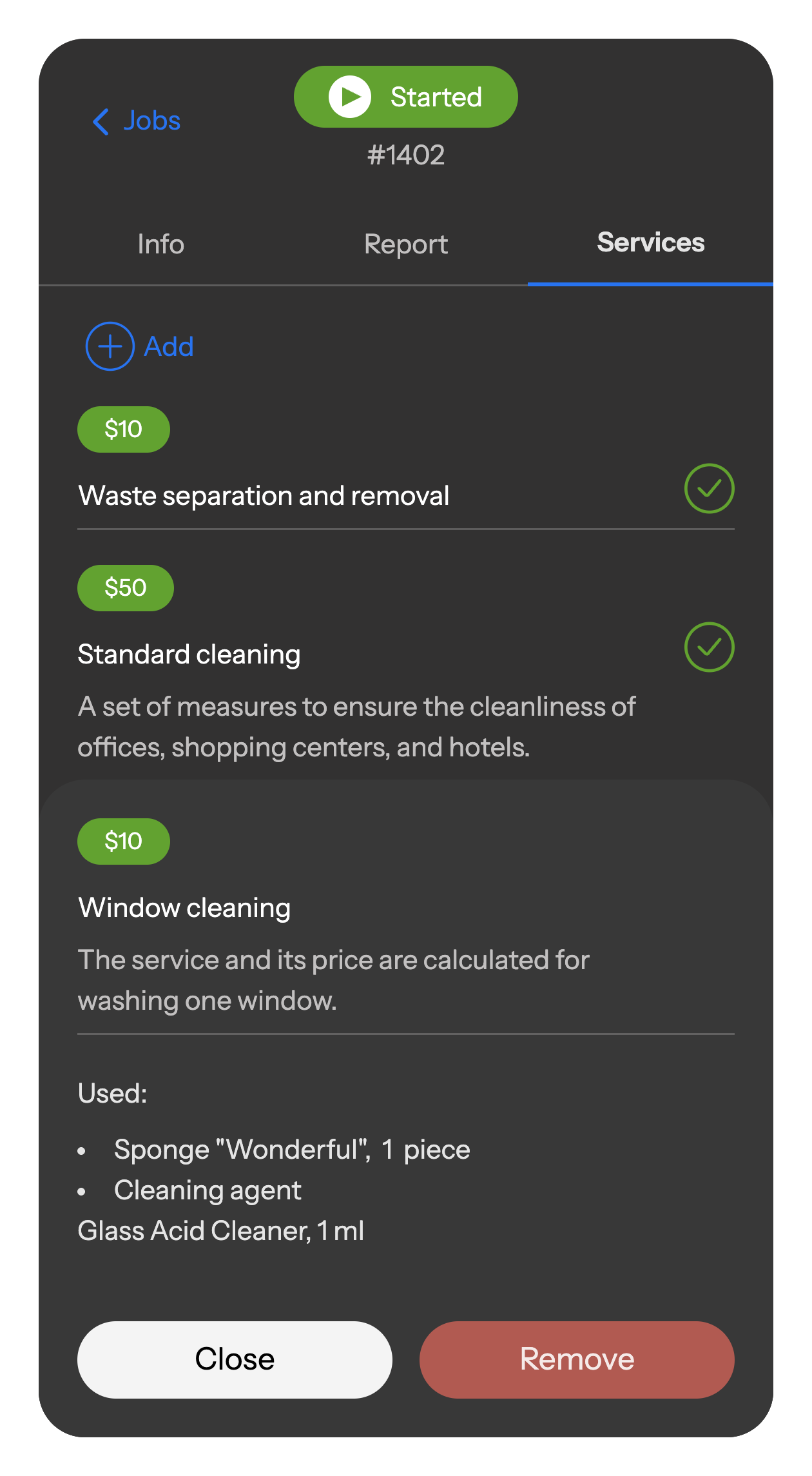
Stay on top of material usage with a built-in catalog.
Cleaners simply log used supplies and completed services in the job — everything is auto-calculated and added to the report.
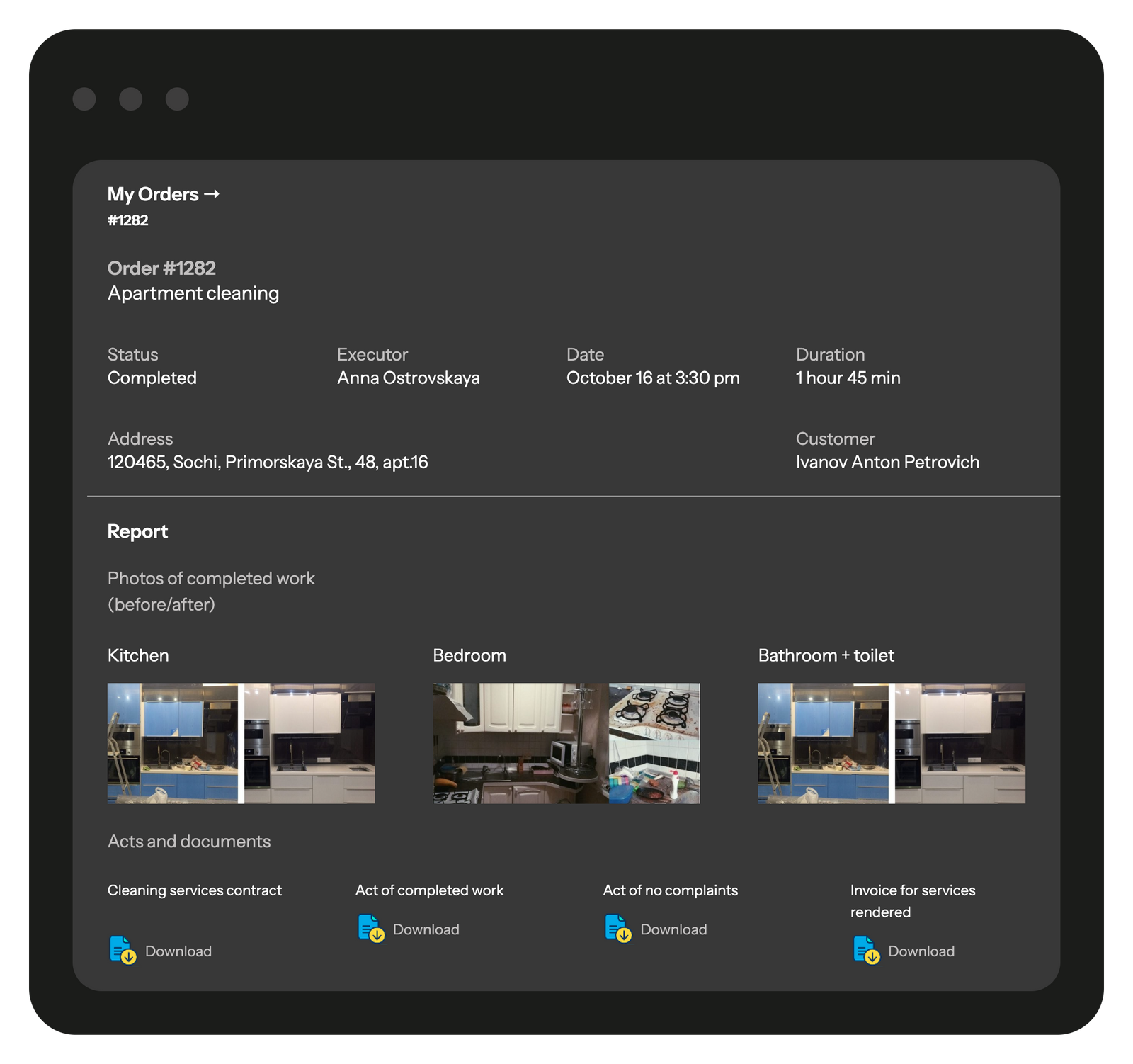
Give your customers a simple, branded page with everything they need — cleaning history, upcoming schedules, and a place to share feedback.
Clients can track job status in real time, view photo reports, and even submit new requests — all in one click..
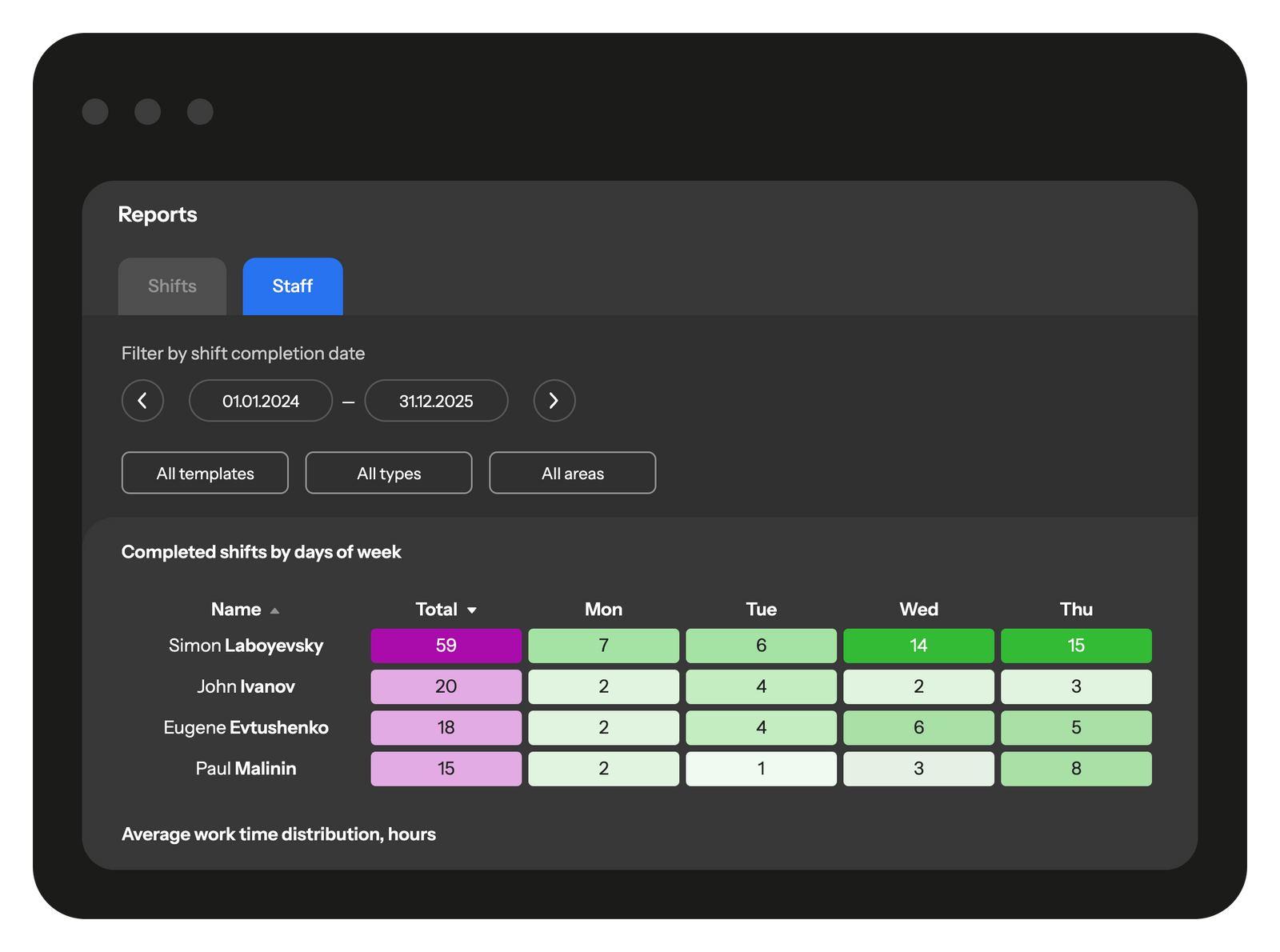
The Reports dashboard gives you instant clarity on every job and every employee. Track progress, spot missed tasks, and measure performance — all in one place.
Planado adapts to the workflows of cleaning businesses of any size:
Set access levels for admins, supervisors, and cleaning crews.
Upload employees, job sites, and tasks in minutes via Excel or API.
Connect with ZohoCRM, Salesforce, Hubspot, or use our API to sync tasks and reports automatically.
Add checklists, photo reports, QR codes, and tailored scenarios for offices, malls, residential buildings, and more.


 Tasks management SchedulingEmployee GPS tracking Employee's mobile appChecklists & reportsTeams & work shiftsCustomer notifications Create jobs in mobile appCRM integrationMileage trackingDocuments signing Recurring jobsProduct catalog and pick listAPI & Webhooks
Yes. In Planado you can create task templates for offices, residential buildings, shopping malls, and more — each with its own custom schedule, checklist, and assigned staff. This makes it easy to manage both small apartments and large commercial contracts within one system.
Field staff use the mobile app to:
Absolutely. You can schedule reports that include photos, comments, and task statuses. Reports can be exported to Excel or PDF, or shared directly with the client.
Yes. Planado supports bulk upload of staff and sites, easy task distribution across multiple crews, and workload tracking for every employee. Whether you manage 10 or 1,000 cleaners, the system scales with your business.
Yes. Permissions are fully customizable. Cleaners only see their own tasks, supervisors see all assigned sites, and managers have full visibility and control.
The mobile app is intuitive and easy to adopt. Even staff with little digital experience typically get comfortable within 1–2 shifts. We also provide online onboarding materials and training for managers.
Yes. You can manage recurring daily or weekly cleaning schedules as well as one-time jobs like deep cleaning or post-construction cleanup.
Planado supports checklists, photo reports, and client feedback collection. Supervisors can also perform quality audits directly in the app, ensuring standards are consistently met.
Yes. You can log the use of detergents, equipment, and consumables within tasks, making it easier to control inventory and prevent overspending.
Yes. Many outsourcing providers use Planado to manage cleaning crews across dozens of client sites, from small offices to entire shopping malls.
Yes. Staff can complete tasks without internet connection; all data syncs automatically once they are back online.
Yes, most systems can keep recurring jobs and different locations organised without much effort. They help prevent mix-ups when teams move between sites. If your schedule often shifts, it’s worth testing how Planado handles those patterns.
Yes, most tools give cleaners a simple way to note what they’ve used during a visit. Over time it helps you spot patterns – when certain supplies run out too quickly or when stock levels don’t match what you expected. If you’ve ever wondered where consumables disappear, this kind of tracking usually answers that question faster than manual lists.
A CRM keeps the small things straight – preferences, notes, past issues – so visits run smoother. Clients feel the difference when nothing has to be repeated twice. It’s a simple upgrade that often pays off quickly.
Cleaning job apps focus more on checklists, photos, and job-by-job tracking, while general tools cover broader field tasks. That difference becomes noticeable when you need proof of work for clients. If cleaning quality is part of your promise, the specialised apps usually fit better.
It usually works even better at scale because everything ends up in one place instead of scattered across spreadsheets. Managers see patterns sooner and can align teams more easily. If your operation is growing, centralising tools can save you from bigger headaches later.
Planado saves money mostly by stopping the little inefficiencies that eat up time – unclear instructions, missing photos, or tasks that have to be repeated because something was overlooked. With a clearer workflow, crews work straighter and supervisors don’t spend evenings sorting out what actually happened on site. Many teams notice that once mistakes and rework drop, the monthly costs quietly follow.
Running a cleaning business looks manageable until the day unravels. A missed shift here, a rushed job there, and suddenly the whole schedule feels shaky. That’s usually when owners start looking for cleaning business software, because the familiar mix of calls and spreadsheets stops keeping pace with real operations. With the right tools in place, you get a clearer view of who is available, which jobs need attention, and where delays might appear.
Teams usually stumble over the same things: someone forgets a small task, a report arrives hours later than planned, or no one quite remembers what happened on-site. Supervisors end up piecing the day together from half-messages. A solid cleaning software setup doesn’t magically fix everything, but it gives cleaners a clearer structure to follow – a checklist they see before they start and a quick way to capture photos without hunting for them later. It takes a bit of the mental load off the team.
As companies pick up more clients or take on bigger sites, the pressure shows up in unexpected places. One crew runs smoothly while another keeps slipping behind, and it’s not always obvious why. That’s when cleaning service software becomes useful. Real-time notes, quick status taps in the app, and GPS breadcrumbs let managers see patterns instead of guessing. Customers feel the difference too – not because the job changes, but because the service suddenly feels steadier.
Cleaning companies deal with a lot of moving parts: shifting schedules, different building types, crews working in parallel, and clients who expect spotless results every time. Good cleaning business software takes these scattered pieces and turns them into a workflow that makes sense in real life. Instead of juggling messages and last-minute notes, managers get a single place where tasks, schedules, and job details stay organized. The goal isn’t to add more tech to the day – it’s to make the work feel less chaotic for everyone.
Most teams start seeing the impact when the essentials fall into place. A reliable cleaning software setup shows who is assigned where, sends quick status updates, and gives cleaners a clear checklist before they begin. With cleaning management software, every job has structure: photos for proof, required fields that prevent guesswork, and GPS breadcrumbs so supervisors can see if a route made sense. For larger crews, cleaning company software ties it all together – recurring jobs, multi-phase tasks, or one-off visits all sit in one system, and nothing gets lost between shifts. It’s a small change on paper, but it removes a lot of friction from daily operations.
Cleaning work looks routine from the outside, but anyone who manages a crew knows how quickly the day can fall apart. One cleaner forgets a task, another finishes without sending a report, and a supervisor doesn’t find out until the client complains. That’s the moment most teams realize they’ve outgrown manual coordination. Modern cleaning service software helps keep these everyday issues from snowballing. It gives managers a clearer picture of what is actually happening on-site and helps cleaners follow the same standard no matter where they are.
A lot of problems start small: a skipped checklist item, a room left half-finished, or a cleaner who couldn’t remember the exact instructions. With cleaning job apps, the workflow becomes harder to misplace. Cleaners see their tasks laid out step by step, and they’re asked for photos or notes before closing the job, so nothing gets “forgotten” on the way back. Supervisors don’t need to chase anyone for updates – they can open the dashboard and instantly see what’s done, what’s in progress, and what needs a second look. It’s not about micromanaging; it’s about giving the team a stable structure that keeps the day from drifting.
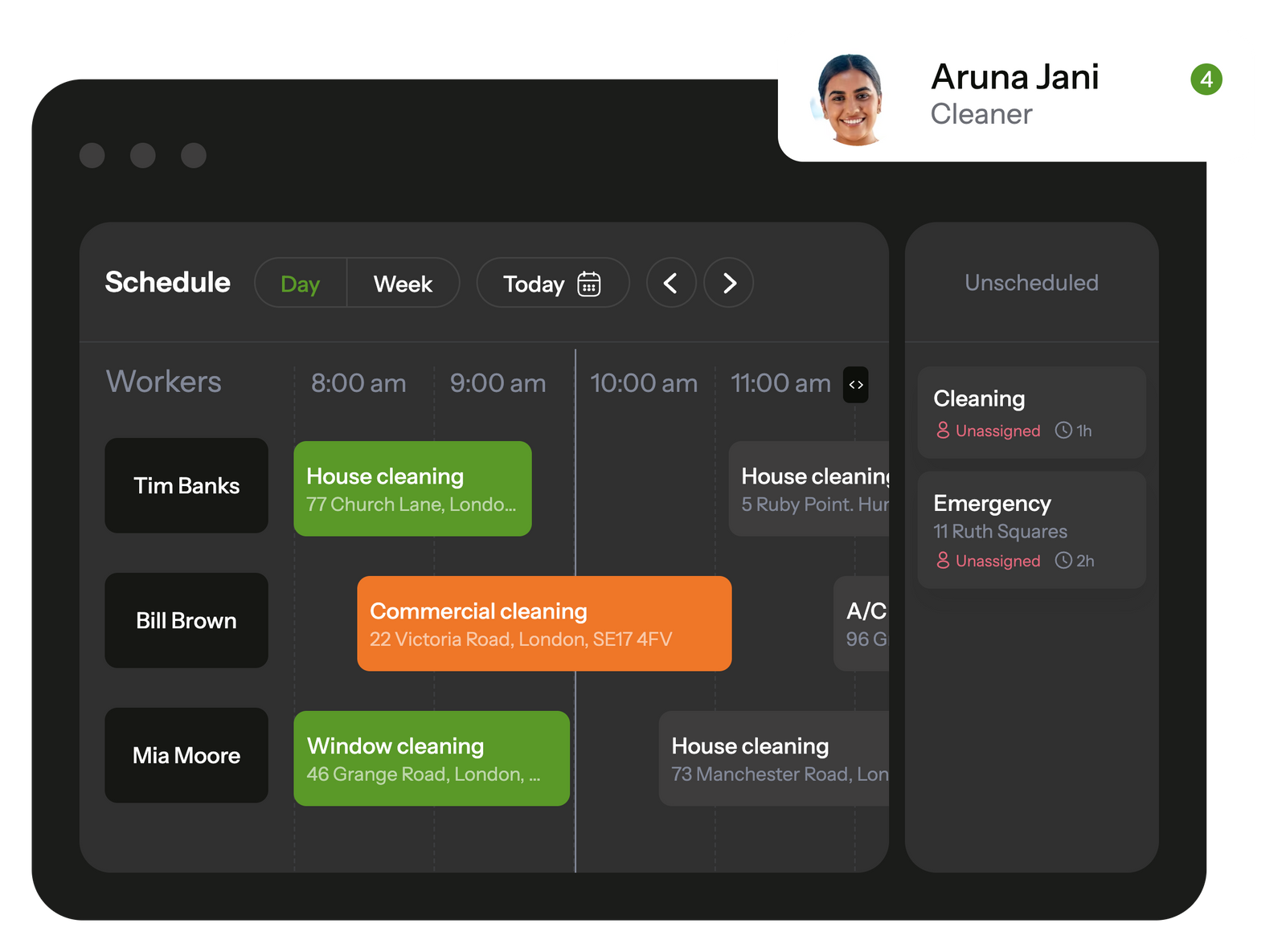
Schedules in cleaning companies rarely stay still. A shift change, an urgent request from a client, or a cleaner stuck across town can distort the whole day. Good cleaning scheduling software makes the moving pieces easier to manage. Instead of rewriting the plan every hour, managers see who’s free, who’s busy, and which jobs can be reassigned without slowing everything down. In Planado, these updates show up in real time, so you’re not guessing whether a team is still on-site or already heading to the next building. It’s planning that reacts quickly, but doesn’t feel chaotic.
A scheduling app only matters if cleaners actually use it. In Planado, they see their upcoming jobs the moment the dispatcher assigns them, with alerts that cut through the noise of group chats and phone calls. Real-time status changes – on the way, started, finished – give managers a simple way to follow the day without constant check-ins. And because each job carries its own instructions, checklists, and notes, cleaners don’t have to rely on memory or scroll through old messages. A scheduling app for cleaning business should make coordination lighter, not heavier, and that’s where Planado usually clicks for teams.
Quality problems in cleaning usually show up only after a client points them out. Cleaning company software helps prevent that by giving teams a simple, consistent way to record what was done the moment a job is finished. Instead of handwritten notes or scattered photos in chat threads, everything flows into one place where supervisors can review it without delays. With tools like Planado supporting the workflow, reports look clearer, issues surface earlier, and maintaining quality becomes much easier across multiple sites.
Digital checklists keep cleaning tasks consistent, even when different people work the same site. Staff see exactly what needs to be done, room by room or zone by zone, and can tick off each step as they move through the job. Photo reports add an extra layer of clarity – cleaners document the results before leaving, and managers receive those photos instantly. This removes guesswork, shortens follow-up time, and makes it easier to resolve client questions because everyone is looking at the same record of completed work.
In cleaning operations, small details often determine whether a shift runs smoothly or falls behind. A forgotten checklist item, a site opened later than planned, or a crew taking longer than expected – these things rarely show up in spreadsheets, but they matter in everyday work. Cleaning company management software helps managers catch these moments earlier by putting job timelines, notes, and field updates in one place instead of scattered across chats or paper logs. Planado supports this kind of visibility without turning it into surveillance. Managers can look at real job histories, understand how long certain tasks usually take, and spot repeated delays or gaps that might need attention. It’s a practical way to keep standards on track: not by hovering over the team, but by having enough context to address problems before they grow. In busy cleaning environments, that kind of grounded insight often makes supervision feel more manageable for both sides.
A growing cleaning team usually reaches a point where old routines stop working – not dramatically, just in small ways that pile up. Someone misses a site note, a recurring job is carried out slightly differently each week, or a supervisor spends half the morning trying to match staff to the right locations. That’s when a system built for scale starts to make sense. With cleaning business management software such as Planado, these loose ends sit in one place instead of floating between chats, spreadsheets, and memory. New employees get clearer guidance, recurring jobs follow the same standards, and managers can notice early signs of overload before it spreads across the schedule.
A CRM for cleaning business becomes especially helpful once the team starts juggling many clients and sites. Instead of digging through chats or trying to remember who requested what last week, all customer details sit in one place – past jobs, notes from supervisors, preferred cleaning times, building access rules, even small preferences that matter during repeat visits. Having this information organized means you can assign the right staff without guessing and keep recurring schedules steady. It also gives clients the sense that nothing gets lost between visits, which makes long-term relationships easier to maintain and gives your team room to grow without losing track of the basics.
cleaning management software When a cleaning team grows, the real challenge often isn’t the work itself – it’s keeping the day organised without endless calls, unclear instructions, or reports that arrive too late to be useful. Planado helps cleaning companies bring all of these moving parts into one place so jobs run on time, supervisors stay informed, and clients always know what was done. Instead of asking managers to rebuild processes from scratch, the system supports the way teams already work: clear job templates, detailed checklists, and simple reporting tools that fit naturally into a cleaner’s routine. One advantage cleaning companies appreciate early on is how quickly the setup comes together. Templates, photo reports, client notifications, and user roles can be configured for your workflow from day one, which means the platform starts delivering structure before the team has to change its habits. Features like material tracking, location-based controls, and the built-in client portal add the kind of transparency that reduces complaints and helps supervisors stay confident about the quality of each visit. Over time, the history of completed work becomes a reliable source of insight: which teams handle specific sites well, where extra training might help, and how workloads shift across the week. If your current tools slow you down or make scheduling and quality control harder than they should be, consider trying a platform built for the realities of cleaning work. Planado brings structure to busy days, keeps teams aligned, and helps you show clients clear proof of every job. Start your free trial to see how organised workflows, mobile reporting, and easy scheduling can support your cleaning business as it grows.